Beautiful, hand-drawn style SVG badges for visualizing AI-assisted development activity in GitHub repositories. Track and display your AI coding sessions with authentic sketchy aesthetics!
- 🎨 Hand-drawn style using Rough.js for authentic sketchy appearance
- 📈 Three badge types: Calendar, daily charts, and summary badges
- 🔄 Real-time data from GitHub repositories via the SpecStory Stats API
- ⚡ Smart caching with 1-hour TTL for optimal performance
- 🌿 Branch support for analyzing different branches
- 📱 Responsive SVGs that scale perfectly anywhere
- 🎯 Customizable display with query parameters and interactive controls
- 🎨 SpecStory branding with logo integration
Visit https://badges.specstory.com to see the badges in action and generate badges for your repository.
Use the hosted service at https://badges.specstory.com — no install required.
- Use any public GitHub repo — badges render from commit history by default. To highlight AI coding activity, optionally include SpecStory session logs in
.specstory/history/(see docs). - Copy these Markdown snippets and replace
OWNER/REPOwith your repository
[](https://badges.specstory.com/OWNER/REPO?primary=calendar)
[](https://badges.specstory.com/OWNER/REPO?primary=daily)
[](https://badges.specstory.com/OWNER/REPO?primary=summary)Example for this repo:
[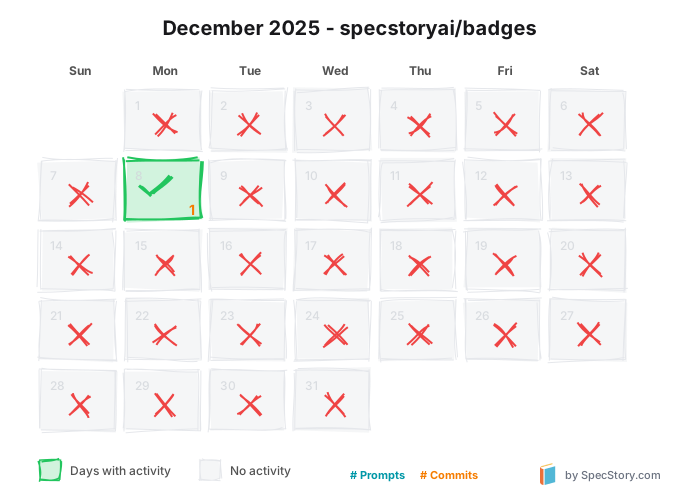](https://badges.specstory.com/specstoryai/badges?primary=calendar)
[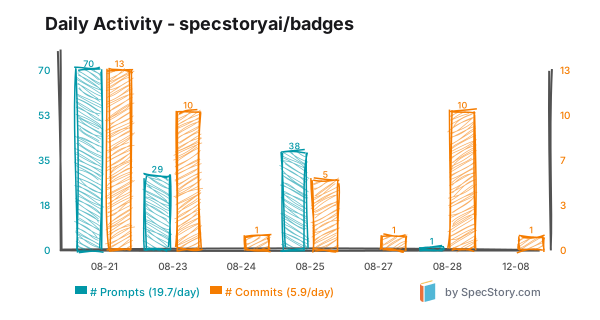](https://badges.specstory.com/specstoryai/badges?primary=daily)
[](https://badges.specstory.com/specstoryai/badges?primary=summary)Optional query params (append to image URL):
month=YYYY-MMfor calendarshowZeroDays=truefor dailybranch=your-branchfor any badge
Monthly calendar view showing daily AI coding activity with green checkmarks for active days and red X's for inactive days.

Query Parameters:
month: Specific month in YYYY-MM format (e.g.,2025-08)branch: Git branch to analyze
Example:
Shows daily prompts and commits as a hand-drawn dual bar chart with independent left/right axes, plus intelligent date labeling that adapts to data density.

Query Parameters:
showZeroDays: Set totrueto show zero-activity days as gray barsbranch: Git branch to analyze
Example:
Compact badge showing total prompts, daily average, and sessions processed.

Query Parameters:
branch: Git branch to analyze
The application includes an interactive demo page at /{owner}/{repo} that allows you to:
- View all badges for any GitHub repository
- Customize display with interactive controls:
- Choose primary badge to highlight
- Select specific months for calendar view
- Toggle zero-activity day visibility
- Specify git branches
- Hide secondary badges for focused view
Navigate to /{owner}/{repo} with these optional parameters:
primary: Choose main badge (calendar,daily,summary)month: Calendar month (YYYY-MM format)showZeroDays: Include zero-activity days (true/false)branch: Git branch namehideSecondary: Show only primary badge (true/false)
Example URLs:
/specstoryai/tnyOffice?primary=daily&showZeroDays=true
/owner/repo?primary=calendar&month=2025-08&branch=develop
/owner/repo?primary=summary&hideSecondary=true
- Rough.js rendering for authentic hand-drawn appearance
- SpecStory logo integrated into each badge
- Calendar view with:
- Green backgrounds and checkmarks for active days
- Gray backgrounds and red X's for inactive days
- Day numbers plus prompt and commit counts
- Month/year title with repository name
- Dynamic height adjustment for months requiring 6 weeks
- Smart date labeling that adapts to data density:
- All dates shown for ≤7 days
- Progressive reduction for larger datasets
- Warm color palette with cream backgrounds (#fffef8)
- Sketchy borders with customizable roughness
All endpoints follow the pattern:
/api/badge/[owner]/[name]/[type].svg
Where:
[owner]: GitHub username or organization[name]: Repository name[type]: Badge type (calendar,daily,summary)
Content-Type: image/svg+xmlCache-Control: public, max-age=3600(1-hour cache)
Add these badges to your README:
# My AI-Assisted Project
## 📊 Development Activity
<!-- Monthly calendar view -->

<!-- Daily activity with hand-drawn bars -->

<!-- Quick stats summary -->

<!-- Specific month calendar -->
<!-- Feature branch activity -->
<!-- Show gaps in activity -->
The badges use the SpecStory Stats API to fetch repository data. The API analyzes .specstory/history directories in GitHub repositories containing AI coding session logs.
For local development, you can configure the badges to use a local stats server:
- Copy the example environment file and adjust as needed:
cp .env.local.example .env.local- The example file contains:
# For local development
NEXT_PUBLIC_STATS_API_URL=http://localhost:3010

# For production (default if not set)
# NEXT_PUBLIC_STATS_API_URL=https://stats.specstory.com-
Start your local stats server on port 3010 (or configure to your preferred port)
-
The badges will now fetch data from your local stats server
To modify the visual style, edit the Rough.js parameters in the route files:
// Adjust these values in the badge route files
{
  roughness: 1.5,      // Higher = more sketchy
  strokeWidth: 2,      // Line thickness
  fillStyle: 'hachure', // Fill pattern style
  hachureGap: 4,       // Gap between hachure lines
  hachureAngle: 60,    // Angle of hachure lines
  bowing: 2            // Line bowing amount
}The application is optimized for Vercel deployment with Next.js 15 and Turbopack.
# Build for production
npm run build --turbopack

# Start production server
npm startThe project includes ESLint configuration for Vercel deployment:
{
  "extends": ["next/core-web-vitals"],
  "rules": {
    "@typescript-eslint/no-explicit-any": "off",
    "@typescript-eslint/no-unused-vars": "off",
    "@next/next/no-img-element": "off",
    "react/no-unescaped-entities": "off"
  }
}- Next.js 15 - React framework with App Router and Turbopack
- Rough.js - Hand-drawn graphics library
- jsdom - Server-side DOM for SVG generation
- TypeScript - Type safety
- Tailwind CSS - Styling for demo pages
- React 19 - Latest React features
badges/
├── app/
│   ├── api/
│   │   └── badge/
│   │       └── [owner]/
│   │           └── [name]/
│   │               ├── calendar.svg/route.ts # Monthly calendar view
│   │               ├── daily.svg/route.ts    # Daily chart endpoint
│   │               ├── trend.svg/route.ts    # Trend line endpoint
│   │               └── summary.svg/route.ts  # Summary badge endpoint
│   ├── [owner]/
│   │   └── [repo]/
│   │       └── page.tsx                      # Dynamic repo page
│   ├── page.tsx                              # Homepage (redirects)
│   ├── layout.tsx                            # Root layout
│   ├── icon.svg                              # Favicon
│   └── globals.css                           # Global styles
├── lib/
│   ├── config.ts                             # Configuration utilities
│   └── utils.ts                              # Utility functions
├── public/
│   └── SpecStory-logo.svg                    # SpecStory logo
├── .env.local.example                        # Environment variables template
├── .eslintrc.json                            # ESLint configuration
├── package.json                              # Dependencies
├── tsconfig.json                             # TypeScript config
├── API_README.md                              # Stats API documentation
└── README.md                                  # This file
Contributions are welcome! Feel free to:
- Fork the repository
- Create a feature branch (
git checkout -b feature/amazing-feature) - Commit your changes (
git commit -m 'Add amazing feature') - Push to the branch (
git push origin feature/amazing-feature) - Open a Pull Request
This project is open source and available under the MIT License.
- Rough.js for the amazing hand-drawn graphics library
- SpecStory Stats API for repository analytics
- Next.js for the awesome framework
- Vercel for hosting and deployment
- Live Application
- SpecStory - AI coding activity tracking
- Stats API Documentation
- GitHub Repository
Built with ❤️ by SpecStory to visualize AI-assisted development activity.