



rpnpy is a reverse-Polish
notation (RPN)
calculator for Python.
The aim is to emulate the operation of early Hewlett-Packard calculators, but generalized by allowing programming in Python, providing access to useful Python functions, and to allow anything to be on the stack.
See the Background section if you're interested to read more about why I wrote this.
rpnpy
- provides typical numeric calculator operations.
- can read commands from the command line, from standard input, or from files.
- has a simple terminal REPL interface and a text-based user interface (TUI) with clickable buttons for digits and common operations and a display of the stack and variables.
- provides for input/output using engineering notation, e.g., 12K.
- provides direct access to over 400 Python functions, pre-imported from the
builtins,math,operator,functools, anddecimalmodules. - is programmable. You can write your own Python functions, to be loaded from a start-up file.
- allows you to put Python data structures, and other objects and functions onto the stack and operate on them.
- uses readline to keep a command history within and between sessions.
- is compatible with Python 3.9 through 3.14.
$ pip install rpnpy. Or if you have uv you
can just run uvx rpnpy.
This will install an rpnpy command (you might want to make a more
convenient / shorter shell alias for it).
You can run rpnpy with the --tui option to have it present a TUI with
buttons, and a stack and variables display.
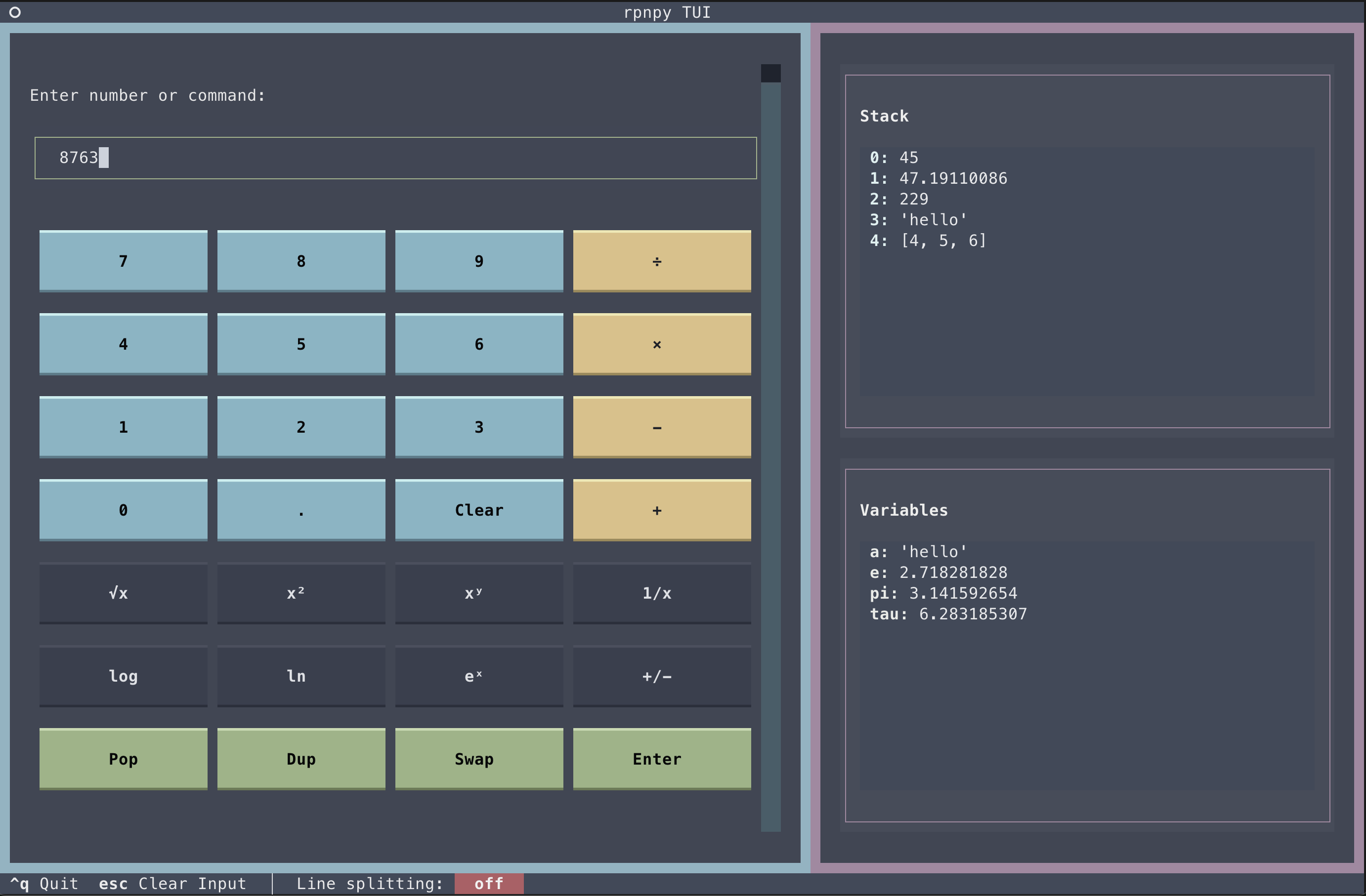
You can still use your keyboard when using the TUI. Use ENTER to send your inputs to the calculator.
Use --theme to choose a (Textual) theme. Currently available theme names
are catppuccin-latte, catppuccin-mocha, dracula, flexoki, gruvbox, monokai,
nord, solarized-light, textual-ansi, textual-dark, textual-light, and
tokyo-night. Run rpnpy --help to see the definitive list.
Click the line splitting "off" button at the bottom to toggle line splitting (see below for details).
Before getting more formal in describing how to use rpnpy, here are some
example command line computations to give you the flavor.
(BTW, I set my shell up to alias pc (Python calculator) for rpnpy to
minimize typing and be a bit more like dc. But I'll use rpnpy in the
examples below.)
# Add two numbers. The stack is printed after all commands are run.
$ rpnpy 4 5 +
9

# Do the same thing, but read from standard input (all the commands below
# could also be run in this way).
$ echo 4 5 + | rpnpy
9

# Sine of 90 degrees (note that Python's sin function operates on
# radians). The commands are in quotes so the shell doesn't expand the '*'.
$ rpnpy '90 pi 180 / * sin'
1.0

# Same thing, different quoting.
$ rpnpy 90 pi 180 / \* sin
1.0

# Same thing, use 'mul' instead of '*'.
$ rpnpy 90 pi 180 / mul sin
1.0

# Area of a circle radius 10
$ rpnpy 'pi 10 10 * *'
314.1592653589793

# Equivalently, using ':2' to push 10 onto the stack twice.
$ rpnpy 'pi 10:2 * *'
314.1592653589793

# Equivalently, using 'dup' to duplicate the 10 and 'mul' instead of '*'
$ rpnpy pi 10 dup mul mul
314.1592653589793On a regular RPN calculator you would do what we normally think of as an
infix operation such as
5 - 4 by pushing 5 onto the stack, then pushing 4, and finally
running the - function. The operator is taken out of middle and given at
the end and the original infix order of the arguments is the order you push
them onto the stack. Of course this doesn't make any difference for
commutative operations like + and *, but is important for / and -.
In Python we have various functions like
map,
filter,
functools.reduce,
and the long-ago deprecated Python 2
apply function.
These are typically thought of as having a prefix or
Polish notation signature,
accepting a function followed by an iterable. E.g.,
map(function, iterable).
To be consistent, with RPN argument pushing just described for the numeric
operations, in the case of (what we normally think of as) prefix functions
such as map, we should therefore push the function to be run, then push
the iterable, then call map (reduce, filter, etc).
Like this:
$ rpnpy 'str:! [6,7,8] map:i'
['6', '7', '8']- Here the
:!modifier causes thestrfunction to be pushed onto the stack instead of being run, and the:imodifier causes the result ofmapto be iterated before being added to the stack. - When you run a function (like
maporapply) that needs a callable (or a function likejointhat needs a string) and you don't specify a count (using:3for example),rpnpywill search the stack for a suitable item and use the first one it finds. It doesn't really have a choice in this case because it doesn't know how many arguments the function (once it is found) will be applied to. This should usually work just fine. You can always use an explicit count (like:3) if not. Note that this situation does not apply if you use the:rmodifier (see below) because in that case the callable (or string, in the case ofjoin) will be expected to be on the top of the stack (and its signature can then be examined to know how many arguments to pass it).
You might find it more natural to use map and friends the other way
around. I.e., first push the iterable, then push the function to be
applied, and then call map. In that case, you can use the :r modifier
to tell the calculator to reverse the order of the arguments passed to a
function. In the following, we push in the other order and then use
map:ir (the i is just to iterate the map result to produce a list).
$ rpnpy '[6,7,8] str:! map:ir'
['6', '7', '8']
Continuing on the map theme, you could instead simply reverse part of the stack before running a function:
$ rpnpy '[6,7,8] str:! reverse map:i'
['6', '7', '8']
The reverse command operates on two stack items by default, but it can
take a numeric argument or you can run it with the :* modifier which will
cause it to be run on the whole stack:
# Reverse the top 3 stack elements then reverse the whole of the stack.
$ rpnpy '5 6 7 8 reverse:3 reverse:*'
[6, 7, 8, 5]# The area of a circle again, but using reduce to do the multiplying. The
# ':!' modifier tells rpnpy to push the '*' function onto the stack
# instead of immediately running it.
$ rpnpy '*:! [pi,10,10] reduce'
314.1592653589793
# Same thing, but push the numbers individually onto the stack, then the
# ':3' tells reduce to use three stack items. Use 'mul' as an
# alternative to '*'.
$ rpnpy 'mul:! pi 10 dup reduce:3'
314.1592653589793
# Equivalently, using ':*' to tell reduce to use the whole stack.
$ rpnpy '*:! pi 10 dup reduce:*'
314.1592653589793
# If you don't want to push the function for 'reduce' to use onto the stack
# first, use ':r' to tell it to use the top of the stack:
$ rpnpy 'pi 10 dup mul:! reduce:3r'
314.1592653589793
# Push 'True' onto the stack 5 times, turn the whole stack ('*') into a
# list and print it ('p'), then pass that list to 'sum'.
$ rpnpy 'True:5 list:*p sum'
[True, True, True, True, True]
5
# Here's something a bit more long-winded (and totally pointless):
#
# Push 0..9 onto the stack (iterating the result of 'range'.
# call Python's 'reversed' function
# push the 'str' function
# use 'map' to convert the list of digits to strings
# join the string digits with the empty string
# convert the result to an int
# take the square root
# push 3 onto the stack
# call 'round' to round the result to three decimal places
#
# the ':i' modifier (used here twice) causes the value from the command
# to be iterated and the result to be put on the stack as a single list.
# It's a convenient way to iterate over a generator, a range, a map,
# dictionary keys, etc.
$ rpnpy 'range(10):i reversed str:! map:ir "" join:r int sqrt 3 round:2'
99380.799The :2 on the round call tells it to use two arguments from the stack
(round uses one by default in rpnpy).
The :r on the map call makes it look for the function to run on the top
of the stack, rather than searching up the stack to find it. If you think
further in advance, you can push the function first:
$ rpnpy 'str:! range(10):i reversed map:i "" join:r int sqrt 3 round:2'
99380.799
The same goes for the string used by join: it could have been pushed
first, and then there would be no need for the :r on the join:
$ rpnpy '"" str:! range(10):i reversed map:i join int sqrt 3 round:2'
99380.799
You could (of course!) do this last example in Python with a bunch of parens:
from math import sqrt
print(round(sqrt(int(''.join(map(str, reversed(range(10)))))), 3))
The elimination of parens is the main beauty of RPN (at least
aesthetically - the stack model of computation is a pretty awesome idea
too). The price is that you have to learn to think in postfix. With the
:r modifier, rpnpy tries to be flexible in where it will find things
on the stack. There's also the swap command in case you forget to push
something and need to flip the top stack items before running some other
command.
It might be convenient to do more involved calculations in an interactive REPL session:
# REPL usage, with automatic splitting of whitespace turned off
# (so we give one command per line).
$ rpnpy --noSplit
--> 4
--> 5
--> 6
--> stack
[4, 5, 6]
--> f  # f is an alias for 'stack', as in dc.
[4, 5, 6]
--> clear  # Or just 'c'
--> f
[]
--> from numpy import log2
--> 32
--> log2
--> p
5.0
--> {'a':6, 'b':10, 'c':15}
--> len
--> p
3
--> [6,7,8]
--> str :!
--> f
[[6, 7, 8], <class 'str'>]
--> swap
--> f
[<class 'str'>, [6, 7, 8]]
--> map :i
--> f
['6', '7', '8']
$ rpnpy --noSplit
--> def celcius(f): return (f - 32) / 1.8 # Nothing is added to the stack here.
--> 212
--> celcius :p # Use :p to print the result immediately
100.0
$ rpnpy --noSplit
--> lambda f: (f - 32) / 1.8
--> 212
--> apply :p
100.0
# Same as above, but push the anonymous function last.
$ rpnpy --noSplit
--> 212
--> lambda f: (f - 32) / 1.8
--> apply :pr
100.0The calculator either works interactively from the shell using a
read-eval-print loop
(REPL) or will read commands either from the command line or from standard
input. If you specify file names (including using - to indicate standard
input), commands will be read from the file(s). Run rpnpy --help to see
command line options.
Input lines are either comments (first non-whitespace character on the line
is #) or specify a command (or commands) followed by optional modifiers.
If given, modifiers must follow a :. The modifiers are a set of single
letters and may also include a single number. The input + :p= 17 causes
the + command to be executed, with modifiers p, =, and 17. The
full list of commands and modifiers is given below.
If modifiers are given, they apply to all commands on an input line.
By default, rpnpy will split lines on whitespace and each field will be
taken as a command. Hence:
$ rpnpy 4 5 +
9
will push 4 and then 5 onto the stack and then replace those two values
by their sum.
In REPL mode, rpnpy prints --> as a prompt (see the REPL section below).
In many cases it is easy to avoid using spaces and inadvertently having your input interpreted as multiple commands. For example, push a list onto the stack:
$ rpnpy
--> [1,2,3]
but if you try that with embedded spaces, you'll get an error:
$ rpnpy
--> [1, 2, 3]
Could not eval('[1,'): unexpected EOF while parsing (<string>, line 1)
Could not exec('[1,'): unexpected EOF while parsing (<string>, line 1)
Did you accidentally include whitespace in a command line?
this can be avoided with the :n (no split) modifier, but note that the
modifier will only affect the next (and subsequent) lines. You can just
give an empty command with the :n modifier to toggle to no line
splitting:
$ rpnpy
--> :n  # no splitting of subsequent lines
--> [1, 2, 3]
If you want rpnpy not to split lines into multiple commands by default,
run with the --noSplit command-line option. You can then use :s (split)
if you instead want to switch to writing input lines that should be split.
Hence:
$ rpnpy --noSplit
--> [1, 2, 3]
--> :s  # split subsequent lines
--> 4 5
the above will first push the list [1, 2, 3] onto the stack, then toggle
to line splitting, and then 4 and 5 will be split (on whitespace),
treated as two separate commands, and result in two more values being
pushed onto the stack.
Leading and trailing whitespace in the command is ignored. Whitespace anywhere in the modifiers is ignored (unless line splitting is on, in which case you will get errors).
Numbers can be inputted using engineering notation:
$ rpnpy
--> 20k 1.5M +
1.52M
Values on the stack will only be displayed using engineering notation if they were inputted so:
$ rpnpy
--> 2000
--> f
--> [2000]
--> 2k
--> f
--> [2000, 2k]
--> +
--> [4k]
When reading from standard input, the lines will be split on whitespace and each field is treated as a separate command. This allows for simple command-line usage such as
$ echo 4 5 + | rpnpy
9
For convenience, modifiers can be preceded by whitespace:
$ echo 100 log10 :! apply | rpnpy
2.0
In the above, the :! modifier applies to the preceding log10 function
(causing it to be pushed onto the stack).
If you have a file of commands you want to pipe into rpnpy you might
want to turn off this splitting:
$ cat data
4
5
# This is a comment
+

$ rpnpy < data
9
You can change the separator using --separator:
$ echo 4_5_+ | rpnpy --separator _
9
By default, the final calculator stack is printed when standard input is exhausted:
$ echo 4 5 | rpnpy
[4, 5]
You can disable the final printing with --noFinalPrint:
$ echo 4 5 | rpnpy --noFinalPrintin which case you can print things yourself using the p command (see
below).
In REPL mode, the calculator repeatedly prints a prompt, reads a command, and executes it. For example:
$ rpnpy
--> 4 5 +
--> p
9
you can change the prompt using --prompt on the command line.
There are two kinds of commands: special and normal.
apply: Apply a function to some arguments.clear(orc): Clear the stack.dup(ord): Duplicatecount(default 1) arguments.functions: Print a list of all known functions.join: Join stack items with a string.list: Convert the top stack item to a list by iterating it. With a count > 1 pops that many stack items off the stack and into a list that is pushed.pop: Popcount(default 1) stack item.print(orp): Printcount(default 1) stack item from the top of the stack.quit(orq): Quitreverse: Reverse thecount(default 2) top stack items.reduce: Repeatedly apply a function to stack items (see functools.reduce).stack(orsorf): Print the whole stack.store: Store the value on the top of the stack into a variable (whose name has previously been pushed onto the stack). If given a numeric argument, that number of items from the stack will be stored into the variable as a list.swap: Swap the top two stack elements.undo: Undo the last stack-changing operation and variable settings.version: Print therpnpyversion.variables: Show all known variables and their values.
Many functions from the builtins, math, and operator modules are
available. Often you can just type the function name (e.g., log10 not
math.log10). You can call a function with an argument if you want and
the result will be pushed onto the stack:
# This works unquoted in bash. You may need quotes in your shell (e.g, in fish).
$ rpnpy abs(-50)
50
or if you just name the function it will be applied to the item (or items)
on the top of the stack, using a heuristic guess at the number of arguments
the function would normally take (the number of positional or
positional-or-keyword arguments). If the guess is wrong, you can always
undo and run the function again with an explicit number of arguments.
# Call 'round' (which takes one argument by default) on pi.
$ rpnpy pi round
3

# Round pi to 10 decimal places. :2 tells 'round' to use two stack arguments.
$ rpnpy pi 10 round:2
3.1415926536
You can use the functions command to see a list of all known functions
and the number of arguments they'll expect on the stack (assuming you don't
pass arguments directly as with abs(-50) above or use a numerical
modifier (e.g., :3) to explicitly specify the number of arguments that
should be passed). Here's the first part of the output of functions:
$ rpnpy functions
!= Function(ne (calls operator.ne with 2 args))
* Function(mul (calls operator.mul with 2 args))
+ Function(add (calls operator.add with 2 args))
- Function(sub (calls operator.sub with 2 args))
/ Function(truediv (calls operator.truediv with 2 args))
== Function(eq (calls operator.eq with 2 args))
Context Function(Context (calls decimal.Context with 0 args))
Decimal Function(Decimal (calls decimal.Decimal with 1 arg))
DecimalTuple Function(DecimalTuple (calls decimal.DecimalTuple with 3 args))
abs Function(abs (calls operator.abs with 1 arg))
acos Function(acos (calls math.acos with 1 arg))
acosh Function(acosh (calls math.acosh with 1 arg))
add Function(add (calls operator.add with 2 args))
all Function(all (calls builtins.all with 1 arg))
and_ Function(and_ (calls operator.and_ with 2 args))
any Function(any (calls builtins.any with 1 arg))
ascii Function(ascii (calls builtins.ascii with 1 arg))
asin Function(asin (calls math.asin with 1 arg))
asinh Function(asinh (calls math.asinh with 1 arg))
atan Function(atan (calls math.atan with 1 arg))
atan2 Function(atan2 (calls math.atan2 with 2 args))
atanh Function(atanh (calls math.atanh with 1 arg))
attrgetter Function(attrgetter (calls operator.attrgetter with 1 arg))
# 300+ lines deleted
Modifiers for a command are introduced with a colon, :. The modifiers are
all single letters and may also include a single non-negative integer. When
line splitting is on, the colon and modifier letters and integer cannot
contain whitespace. I.e., :pr34. If line splitting is off, whitespace is
allowed (and ignored).
The full list of modifiers is:
-
!: Push the given thing (either a function or a variable) onto the stack, do not try to run or evaluate it. -
*: Use all arguments from the stack in the command execution. -
=: The command will be run but the stack will not be altered (think: keep the stack equal). This is useful in combination with thepmodifier to print the result. It can be used to try an operation and see its result without actually doing it. If you do execute a command and want to undo it, there is also theundospecial command. -
c: Force the command line string to be interpreted as a special command. This must be used if you define a variable with a name likequitorpopand you then can't call the specialquitcommand. -
D: Toggle debug output. -
i: Iterate the result of the command and put the values onto the stack in a list. This is useful when you call a function that returns a generator or other special iterable object. It's a convenience for just calling the function (which would put the generator onto the stack) and then runninglist. -
n: Turn off (think: no) line splitting. Note that this will only go into effect from the next command on. -
p: Print the result (if any). See also the:Pmodifier and the--printargument torpnpy. -
P: Toggle automatic printing of all command results. -
r: When applied to a special command, reverses how the function (formap,apply,reduce) or a string (forjoin) is looked for on the stack. Normally the function or string argument to one of those special functions has to be pushed onto the stack first. If:ris used, the function or string can be given last (i.e., can be on the top of the stack). In other contexts, causes all arguments given to a function to be reversed (i.e., to use a stack order opposite to the normal).```sh $ rpnpy '+:! 5 4 apply' 9 $ rpnpy '5 4 +:! apply:r' 9 $ rpnpy '5 4 -' 1 $ rpnpy '5 4 -:r' -1 ``` -
s: Turn on line splitting on whitespace. Note that this will only go into effect from the next command on.
If a count is given, it is either interpreted as a number of times to push something onto the stack or the number of arguments to act on, depending on context (um, sorry about that - should be clearer).
You can set variables and push them (or their values) onto the stack:
$ rpnpy --noSplit
--> a = 4
--> a
--> f
[4]
--> a:!
--> f
[4, Variable(a, current value: 4)]
--> a = 10
--> f
[4, Variable(a, current value: 10)]
--> 20
--> +:p
30The effect of commands on the stack and variables can be undone with the
undo command. There is currently only one level of undo.
rpnpy will look for a start-up Python file to exec in
~/.rpnpy/startup.py. To specify an alternate location for the file, use
--startupFile and to disable reading of the start-up file, use
--noStartup.
Functions defined in the start-up file can be used without arguments and will be applied to their correct number of arguments pulled from the stack.
You can give your functions additional names:
from math import sqrt

def heron(a: float, b: float, c: float) -> float:
    """
    Calculate the area of a triangle given its three sides
    See https://en.wikipedia.org/wiki/Heron's_formula
    """
    s = (a + b + c) / 2.0
    return sqrt(s * (s - a) * (s - b) * (s - c))

heron.names = ("area",)


def fact(n: int) -> int:
    return factorial(n)

fact.names = ("!",)
Then, use either name:
$ rpnpy
--> 3 4 5 heron p
6.0
--> 15 ! p
1307674368000rpnpy makes use of Python's
readline library to
allow familiar/comfortable command line editing. Your input history will be
saved to ~/.rpnpy/history. The location of the history file can be set via
--historyFile and history usage can be disabled via --noHistory.
I wrote this for three reasons:
-
I absolutely loved the HP-41C programmable calculator series, which used RPN. Although I had taught myself to program on a Casio FX-502P in 1978, the Casio was like a toy compared to the HP-41C. I owned a 41C, a 41CV, and then a 41CX, had a bunch of memory expansion packs, several other add-on packs (e.g., stats), a card reader/writer, and got it overclocked by some hardware hacker friends. It was an amazing machine. I still have one.
-
I have been using the UNIX dc (desk calculator) command on almost a daily basis since 1983.
dcis ancient (in UNIX terms), predating even the C programming language. It provides a minimalist RPN calculator. You can even program it, if you have a taste for mystery. Here's a program I wrote in 1984 to factor numbers:[[neither]plsx]sn[c2pla2/sallx]se[ladv1+sm0=nla1=ncla2=pla2%0=elfx]sl [ldlm<pclald%0=cld2+sdlfx]sf[lap[is prime.]plsx]sp[ldplald/salfx]sc [[enter X : ]P?dsa0>n3sdllx]ss[[negative]plsx]snlsxThat code still runs today, 35 years later, totally unchanged. But
dchas only a tiny set of operations. So while it's great to be able to easily use it from the command line (e.g.,echo 4 5 + p | dc), I frequently find myself reaching for a real calculator or launch an interactive session with a full programming language (Perl, Python, etc), which feels a bit heavyweight and requires more syntax. -
I was curious what it would be like to have a Python RPN calculator that offered both the minimalist syntax of
dcbut that also offered a much wider range of operations and made it possible to put Python objects (lists, dicts, functions, etc.) onto the stack and operate on them. I was curious to see what use I might make of that, and what others might do with it, too.
- Add direct access to functionality from numpy.
- Add rotate-right and rotate-left stack modifying functions?
As of version 2.0.0, the rpn.py script has been moved into
src/rpnpy/cli/rpn.py. You can call it using the rpnpy command that the
package now installs.
To David Pattinson (@davipatti) for various nice ideas, including executing the command line arguments.
To Ron R. Hightower for suggesting adding a UI, to Will McGugan and the other contributors to the Textual project, and to the claude.ai CLI that wrote 100% of the TUI code.